> For the complete documentation index, see [llms.txt](https://docs.tresori.xyz/llms.txt). Markdown versions of documentation pages are available by appending `.md` to page URLs; this page is available as [Markdown](https://docs.tresori.xyz/analytics.md).
# Analytics
The Analytics section provides users with detailed insights into wallet usage, user engagement, and transaction performance for their projects. It helps teams monitor adoption, measure effectiveness, and make data-driven decisions.
The Analytics dashboard is project-specific. Users must select a project to view its analytics data.
**Select Project**
* Users must choose a project from the **Select Project** dropdown.
* Analytics data is displayed only after a project is selected.
> This ensures metrics are always aligned with the correct project configuration.
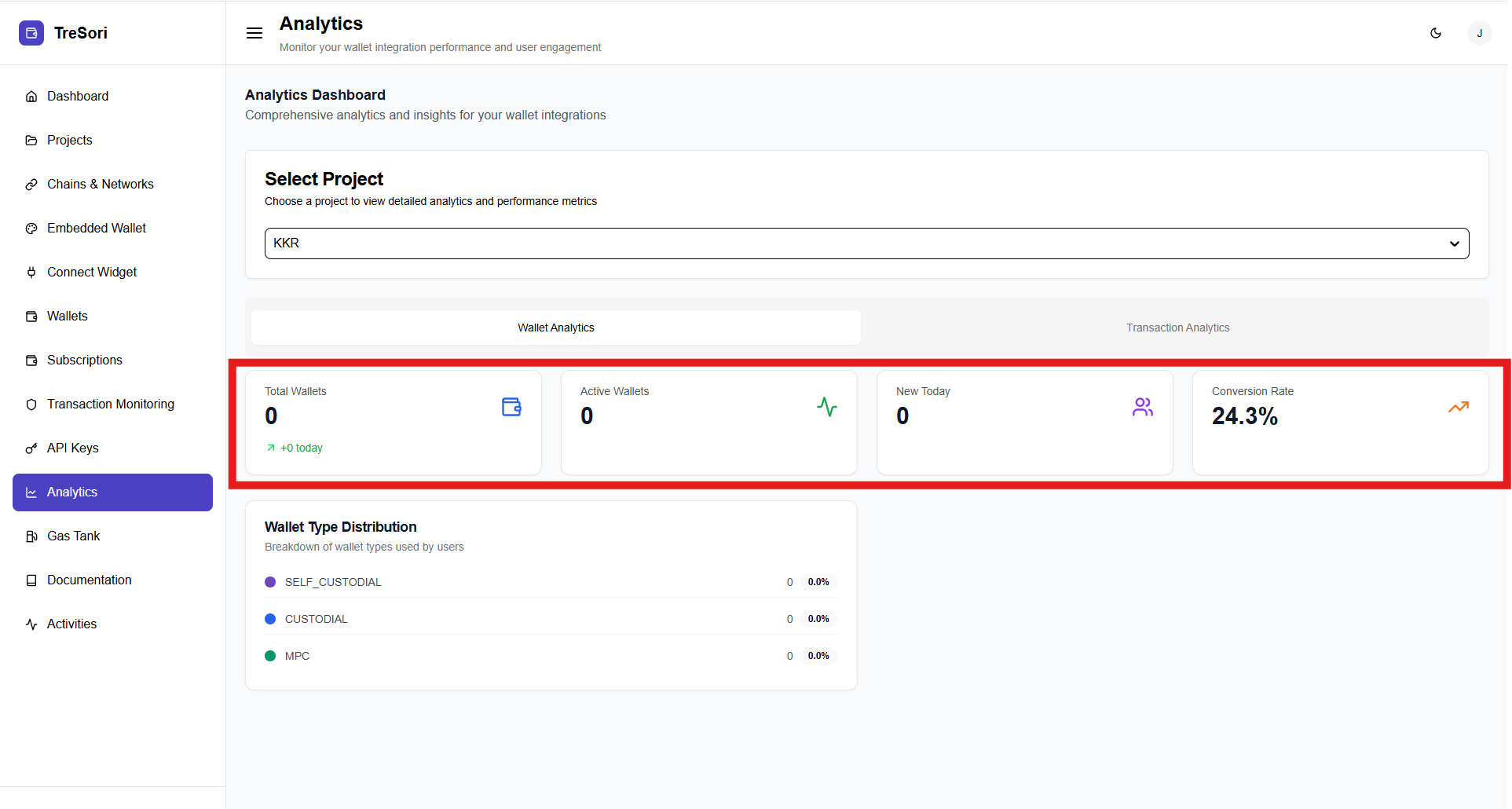
Once a project is selected, the **Wallet Analytics** section displays key wallet-related metrics.
#### Key Metrics
**This Analytics is devide into two section "Wallet Analytics" and "Transacion"**
* **Total Wallets**
* Displays the total number of wallets created under the selected project.
* Includes a daily change indicator (e.g., “+0 today”).
* **Active Wallets**
* Shows the number of wallets that are currently active and interacting with the application.
* **New Today**
* Indicates the number of new wallets created on the current day.
* **Conversion Rate**
* Represents the percentage of users who successfully completed wallet creation after initiating the connection flow.
#### Wallet Type Distribution
The Wallet Type Distribution section provides a detailed breakdown of wallets created within a selected project based on the wallet architecture in use. This view helps teams understand user preferences, security posture adoption, and infrastructure utilization across different wallet models.
#### Supported Wallet Types:
* **Self Custodial**
* **Custodial**
* **MPC (Multi-Party Computation)**
For each supported wallet type, the dashboard displays:
* **Total number of wallets** created under that wallet type
* **Percentage share** of the total wallets in the project
This data is calculated in real time and updates as new wallets are created or existing ones become active.
> This helps teams assess which wallet model is most commonly used and whether their configuration aligns with user behavior.
### Transaction Analytics
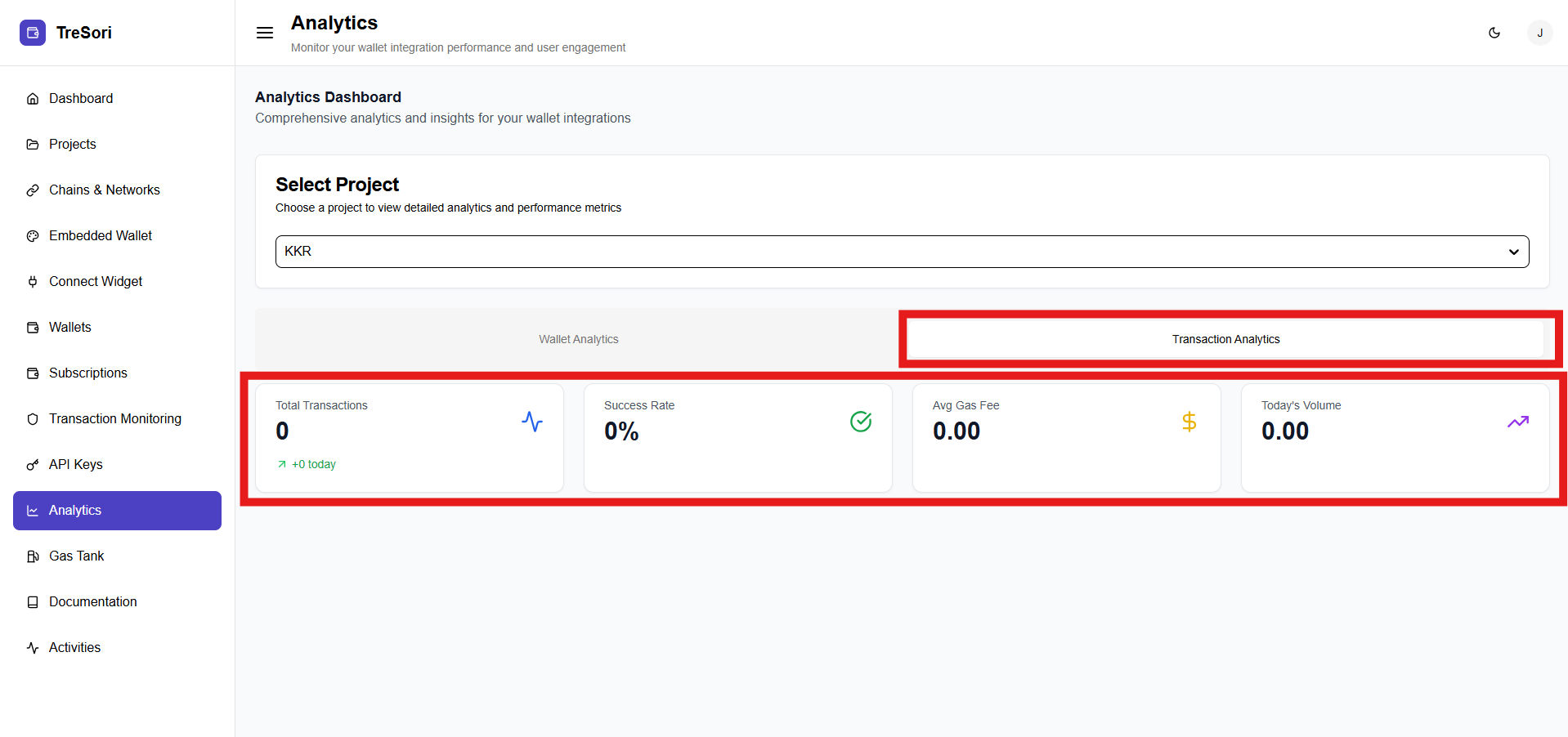
The Transaction Analytics section provides detailed insights into transaction activity within the selected project, enabling users to monitor transaction volume, performance, cost efficiency, and reliability across wallet integrations. Once a project is selected, the dashboard displays real-time and historical transaction metrics, offering a clear view of how transactions are executed and utilized within the project.
#### Key Transaction Metrics
**Total Transactions**
Displays the total number of transactions initiated within the selected project, along with a daily change indicator (e.g., **+0 today**). Helps track overall transaction activity and adoption trends, making it easier to identify growth patterns or usage drops over time.
**Success Rate**\
Shows the percentage of transactions that were successfully completed out of all initiated transactions. Reflects transaction reliability and network stability. A low success rate may indicate issues such as network congestion, insufficient gas, smart contract failures, or user-initiated rejections.
**Average Gas Fee**\
Represents the average gas fee paid per transaction during the selected timeframe. It helps to evaluate transaction cost efficiency and assess network selection, gas optimization strategies, and the impact of gasless transactions.\
For gasless-enabled projects, this value may appear as zero or near zero for end users.
**Today’s Volume**
Indicates the total transaction volume processed on the current day, typically measured in the native or configured token. Supports real-time operational monitoring by highlighting daily activity spikes or drops, enabling quicker response to usage changes.